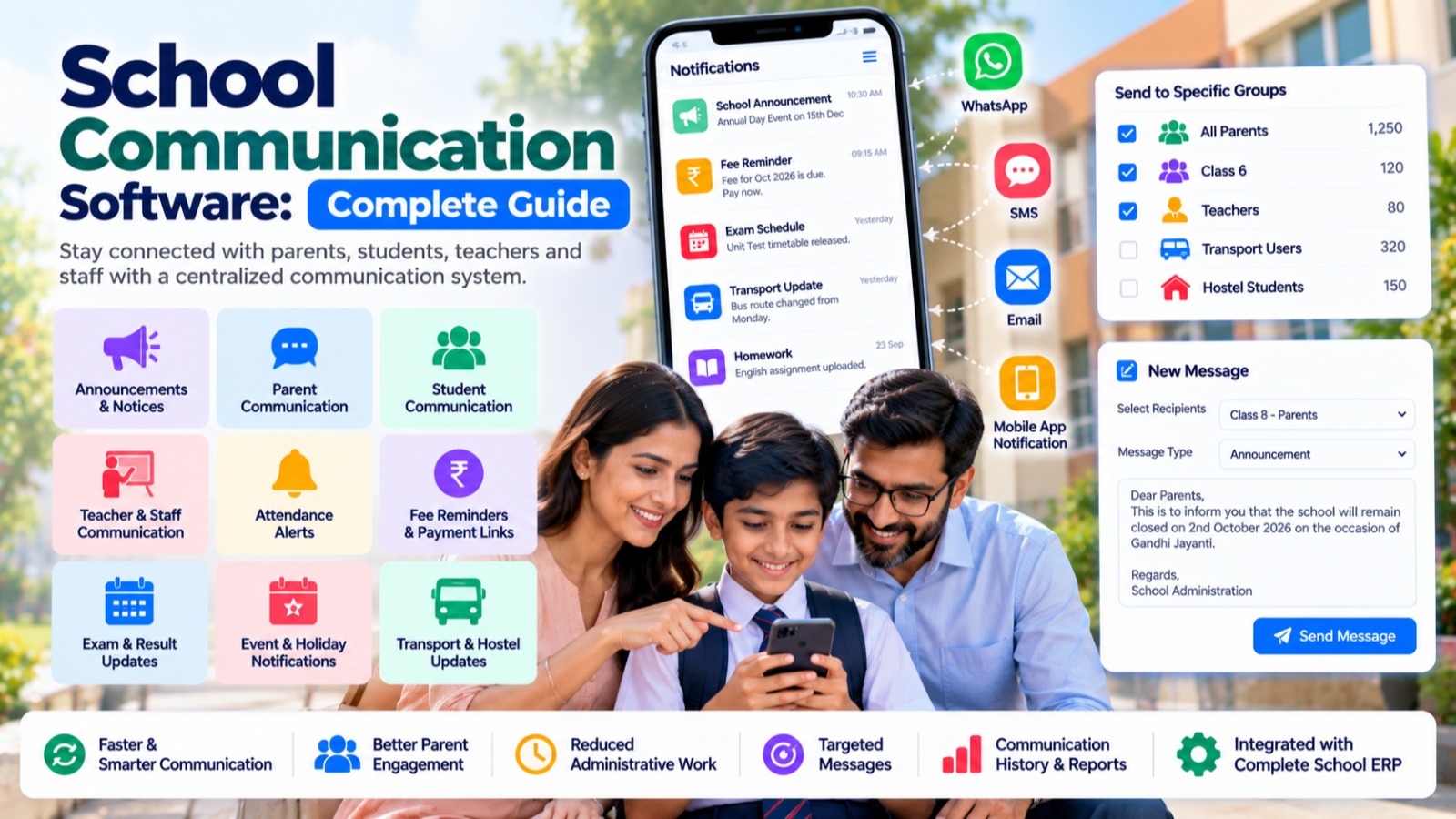

Effective communication is one of the most important parts of running a modern school. Schools regularly need to communicate with parents, students, teachers, staff, and administrators about attendance, fees, examinations, holidays, events, homework, notices, emergencies, and other important information.
When communication depends on paper notices, phone calls, WhatsApp groups, spreadsheets, and multiple disconnected applications, important information can easily become difficult to manage.
School Communication Software provides a centralized platform for managing school announcements, notifications, messages, reminders, alerts, and communication between the school and its community.
Modern School ERP platforms such as S2DENTSHIVE provide communication features as part of a centralized School ERP, allowing schools to connect communication with student management, staff management, attendance, fees, examinations, timetable, transport, hostel, library, and other school operations.
This complete guide explains what School Communication Software is, its key features, benefits, communication channels, implementation process, and how S2DENTSHIVE can help schools improve communication.
What Is School Communication Software?
School Communication Software is a digital platform that helps educational institutions communicate with parents, students, teachers, staff, and administrators through centralized communication channels.
Instead of sending information through multiple disconnected platforms, schools can manage important messages from one system.
A school communication platform can be used for:
- School announcements
- Parent notifications
- Student notifications
- Teacher communication
- Staff announcements
- Attendance alerts
- Fee reminders
- Examination updates
- Holiday notices
- Event notifications
- Homework communication
- Emergency alerts
- General notices
- Important reminders
The goal is to make school communication faster, more organized, and easier to manage.
Why Do Schools Need Communication Software?
Schools communicate with hundreds or thousands of people every day.
For example, a school may need to send:
- Attendance notifications
- Fee payment reminders
- Examination schedules
- Holiday announcements
- Homework information
- Event details
- Transport updates
- Hostel notices
- Admission information
- Emergency messages
Managing all of this through paper notices, individual phone calls, and different messaging groups can become difficult.
A centralized communication system gives the school a structured way to send information to the right people.
Common Problems With Traditional School Communication
Schools using manual or disconnected communication methods may experience:
- Information being missed
- Repeated phone calls
- Multiple WhatsApp groups
- Unorganized announcements
- Difficulty reaching specific classes
- Delayed notifications
- No centralized communication history
- Repeated data entry
- Difficulty sending bulk messages
- Lack of communication tracking
- Confusion between school and parent messages
School Communication Software helps bring these communication activities into one organized platform.
Key Features of School Communication Software
A complete school communication solution should support different types of users and communication requirements.
1. Centralized Announcements
School administrators can publish important announcements from a centralized system.
Announcements can be targeted to:
- Entire school
- Specific classes
- Sections
- Students
- Parents
- Teachers
- Staff
- Specific departments
This makes communication more relevant.
2. Parent Communication
Parents need regular information about their child's school activities.
Communication software can help schools send:
- Attendance updates
- Fee reminders
- Examination information
- Homework
- Events
- Holiday notices
- School announcements
- Important alerts
Parents can receive information without depending entirely on phone calls or physical notices.
3. Student Communication
Students can receive relevant information about their academic activities.
Examples include:
- Timetable updates
- Homework
- Assignments
- Examination schedules
- Results
- Events
- Notices
- Academic announcements
This creates a more connected learning environment.
4. Teacher and Staff Communication
Schools also need an efficient way to communicate internally with teachers and employees.
Administrators can share:
- Staff notices
- Meeting announcements
- Academic instructions
- Event responsibilities
- Examination duties
- Timetable changes
- Important administrative updates
This can reduce dependency on separate communication groups.
5. Class-Wise Communication
Not every announcement needs to be sent to the entire school.
For example:
Class 8-A: Examination reminder
Class 10: Board examination information
Class 5: Field trip announcement
Class-wise communication allows schools to send relevant information to specific groups.
6. Section-Wise Communication
Schools with multiple sections can target messages according to section.
For example:
- Class 7-A
- Class 7-B
- Class 8-A
- Class 8-B
This helps prevent unnecessary notifications for users who are not affected by a particular announcement.
7. Attendance Notifications
Attendance is an important area of parent communication.
A School ERP can connect attendance records with communication workflows.
For example, when a student is marked absent, the school can send an attendance notification to the parent according to the school's configured communication process.
This provides parents with more timely information about attendance.
8. Fee Reminders
Schools regularly need to communicate with parents about pending fees.
Communication software can support reminders related to:
- Upcoming fees
- Pending fees
- Due dates
- Payment links
- Payment confirmation
- Receipts
When communication is connected with fee management, schools can reduce the need for manually contacting parents about every pending payment.
9. Examination Notifications
Schools can communicate examination-related information such as:
- Examination schedules
- Exam dates
- Subject information
- Examination instructions
- Result announcements
- Report card availability
This helps students and parents stay informed.
10. Homework and Assignment Communication
Teachers can communicate homework and assignments digitally.
Messages can include:
- Homework details
- Assignment deadlines
- Subject information
- Study materials
- Important instructions
When connected with the academic management system, communication becomes part of the regular teaching workflow.
11. Event Communication
Schools conduct many activities throughout the academic year.
Communication software can be used for:
- Annual functions
- Sports events
- Competitions
- Parent-teacher meetings
- Educational trips
- Cultural programs
- Workshops
- Celebrations
- School activities
Relevant users can receive event information and reminders.
12. Holiday Notifications
Schools can send notifications about:
- School holidays
- Festival holidays
- Summer vacation
- Winter vacation
- Special holidays
- School closure notices
This reduces confusion and repeated enquiries from parents.
13. Emergency Notifications
Schools may occasionally need to communicate urgent information.
Examples include:
- Emergency closure
- Weather-related updates
- Transport changes
- Important safety announcements
- Urgent schedule changes
A centralized communication system can help administrators distribute such information quickly through supported channels.
14. Transport Notifications
Communication becomes particularly useful when integrated with school transport management.
Schools can communicate information related to:
- Bus routes
- Transport schedules
- Pickup information
- Route changes
- Vehicle updates
- Transport-related announcements
When transport and communication are part of the same School ERP, relevant information can be managed from a centralized platform.
15. Hostel Communication
Residential schools may need to communicate hostel-related information to students, parents, and staff.
Examples include:
- Hostel notices
- Student leave information
- Hostel events
- Important instructions
- Hostel fee reminders
- Student-related updates
Connecting hostel management with communication can make residential school administration more organized.
16. Bulk Communication
Schools often need to send the same message to a large number of recipients.
Examples include:
- Fee reminders
- Holiday announcements
- Event invitations
- Examination notices
- General school announcements
Bulk communication can reduce repetitive administrative work.
17. Targeted Communication
Bulk communication does not always mean sending the same message to everyone.
A good communication system should allow schools to target specific groups.
For example:
Recipients:
- Class 6
- Class 6-A
- Parents
- Teachers
- Hostel students
- Transport users
This helps ensure that users receive only relevant information.
18. Multiple Communication Channels
Depending on the school's requirements and configuration, School Communication Software can work with different channels.
These may include:
- Mobile app notifications
- SMS
- WhatsApp communication
- In-system notifications
- Push notifications
The availability of individual channels depends on the School ERP configuration and connected communication services.
19. Communication History
A centralized system can maintain records of communication.
Administrators can potentially review:
- Announcement
- Date
- Recipient group
- Communication type
- Message
- Status
This creates a more organized communication history than maintaining information across multiple messaging applications.
20. Notification Templates
Schools frequently send similar types of messages.
Templates can help administrators prepare standardized communication for:
- Fee reminders
- Attendance alerts
- Holiday notices
- Examination reminders
- Event notifications
- General announcements
Templates can save time and improve consistency.
Benefits of School Communication Software
Implementing a centralized school communication system can provide several benefits.
1. Faster Communication
Important information can be distributed quickly.
2. Better Parent Engagement
Parents can receive timely updates about their child's school activities.
3. Reduced Administrative Work
Schools can reduce repetitive phone calls and manual messaging.
4. Centralized Communication
Important announcements can be managed from one platform.
5. Targeted Messages
Schools can send information to specific classes, sections, parents, teachers, or staff.
6. Better Transparency
Parents can receive more timely information about attendance, fees, examinations, and school activities.
7. Improved Internal Communication
Teachers and staff can receive administrative instructions more efficiently.
8. Fewer Missed Announcements
Centralized notifications can reduce dependency on physical notices and scattered communication groups.
9. Better Record Keeping
Communication history can be maintained digitally where supported.
10. Integration With School Operations
Communication can be connected with attendance, fees, examinations, transport, hostel, and other modules.
School Communication Software vs WhatsApp Groups
WhatsApp groups are commonly used by schools for communication, but they are not designed specifically as a complete School ERP communication system.
| Feature | WhatsApp/Manual Groups | School Communication Software |
|---|---|---|
| General messaging | Yes | Yes |
| School announcements | Yes | Yes |
| Class-wise communication | Yes | Yes |
| Parent communication | Yes | Yes |
| Attendance integration | No | Yes |
| Fee reminder integration | No | Yes |
| Examination integration | No | Yes |
| Student data integration | Limited | Yes |
| Timetable integration | No | Yes |
| Transport integration | No | Yes |
| Hostel integration | No | Yes |
| Communication history | Limited | Structured |
| Role-based access | Limited | Yes |
| Centralized school data | No | Yes |
The key difference is that School Communication Software can connect communication with the school's operational data.
How Communication Fits Into a School ERP
Communication becomes much more powerful when it is connected with other School ERP modules.
For example:
Student Management → Attendance → Notification → Parent
or:
Fee Management → Pending Fee → Reminder → Parent → Payment Link
Similarly:
Examination → Exam Schedule → Notification → Student/Parent
And:
Transport → Route Update → Notification → Parent
This creates an integrated communication workflow instead of requiring administrators to manually transfer information between different applications.
S2DENTSHIVE Provides School Communication Software
S2DENTSHIVE provides School Communication features as part of its centralized School ERP platform.
The communication system is designed to work alongside other school management modules, allowing schools to connect important notifications with their day-to-day operations.
Schools can use the centralized platform for communication related to areas such as:
- Students
- Parents
- Teachers
- Staff
- Attendance
- Fees
- Examinations
- Timetable
- Homework
- Admissions
- Transport
- Hostel
- Events
- General announcements
- School notices
- Live Classes
This means schools do not need to depend entirely on separate applications for every communication requirement.
Why Use S2DENTSHIVE for School Communication?
One of the main advantages of S2DENTSHIVE is its centralized School ERP approach.
Instead of managing:
- Student information in one system
- Attendance in another
- Fees in another
- Timetable somewhere else
- Communication through multiple groups
schools can manage these operations through one connected platform.
For example:
Fee Reminder Workflow
Fee Management → Pending Fee → Parent Notification → Payment Link
Attendance Workflow
Attendance → Student Absent → Parent Notification
Examination Workflow
Exam Schedule → Student/Parent Notification
Event Workflow
School Event → Selected Class/Group → Notification
These integrated workflows can reduce manual communication work for school administrators.
How Schools Can Manage Communication Using S2DENTSHIVE
A typical communication workflow can include the following steps.
Step 1: Maintain School Data
Keep students, parents, teachers, staff, classes, sections, and other information organized.
Step 2: Select Communication Type
Choose the type of message, such as announcement, reminder, notice, or alert.
Step 3: Select Recipients
Target the message to the appropriate:
- School
- Class
- Section
- Parents
- Students
- Teachers
- Staff
Step 4: Create the Message
Prepare the relevant communication.
Step 5: Send Through the Configured Channel
Use the available communication channel configured for the school.
Step 6: Maintain Communication Records
Where supported, communication history can be reviewed for administrative reference.
S2DENTSHIVE: One Centralized System for School Communication
Schools often use multiple applications to manage different operations.
One application may manage fees, another may manage attendance, another may manage transport, while communication happens through separate messaging groups.
A centralized School ERP can simplify this structure.
With S2DENTSHIVE, schools can manage communication alongside:
- Student Management
- Staff Management
- Admissions
- Attendance
- Camera Attendance
- Fees Management
- Fee Reminders
- Online Payment Links
- Examinations
- Report Cards
- Timetable
- Homework
- Transport
- Hostel
- Library
- Inventory
- Events
- Expenses
- Reports
- Live Classes
This centralized approach can help school owners and principals reduce dependence on multiple disconnected applications.
Who Can Benefit From School Communication Software?
School Communication Software can benefit:
- Private schools
- CBSE schools
- ICSE schools
- State board schools
- International schools
- Boarding schools
- K-12 schools
- School groups
- Multi-branch institutions
- Educational organizations
It is particularly useful for schools that communicate regularly with a large number of parents, students, teachers, and staff.
What Should Schools Look for in Communication Software?
Before selecting a School Communication System, administrators should consider the following features.
1. Parent Communication
The system should support communication between school and parents.
2. Student Communication
Students should receive relevant academic and administrative information.
3. Staff Communication
Teachers and employees should be able to receive internal announcements.
4. Targeted Messaging
The system should support class-wise, section-wise, or role-based communication.
5. Notifications
Schools should be able to send important reminders and alerts.
6. Multiple Channels
Depending on requirements, the system should support suitable communication channels.
7. Integration
Communication should connect with attendance, fees, examinations, timetable, transport, hostel, and other modules.
8. Communication History
Schools should have organized records of important communication where supported.
9. Templates
Frequently used messages should be easy to create and reuse.
10. Centralized School ERP
The communication system should ideally be part of a broader School ERP rather than an isolated messaging application.
Future of School Communication Software
School communication is moving from traditional notices and scattered messaging groups toward integrated digital communication.
Future school communication platforms are likely to focus on:
- Personalized parent communication
- Automated notifications
- Mobile-first communication
- Real-time alerts
- AI-assisted message creation
- Multilingual communication
- Automated fee reminders
- Attendance-based notifications
- Event reminders
- Integrated transport alerts
- Digital parent engagement
- Communication analytics
The goal is to ensure that the right information reaches the right person at the right time.
Conclusion
Effective communication is essential for a well-managed school. Parents need information about attendance, fees, examinations, events, holidays, homework, and other school activities, while teachers and staff require timely internal communication.
School Communication Software provides a centralized way to manage announcements, notifications, reminders, alerts, and messages.
When communication is integrated with School ERP modules, schools can automate useful workflows such as attendance notifications, fee reminders, examination announcements, event updates, transport information, and hostel communication.
S2DENTSHIVE provides School Communication features as part of its centralized School ERP, connecting communication with student management, staff management, admissions, attendance, fees, examinations, timetable, transport, hostel, library, inventory, events, live classes, and other school operations.
For school owners and principals, using one centralized system can simplify communication while reducing dependence on multiple disconnected applications.
Comments (0)
Share your thoughts or ask a question about this article.
Leave a Comment