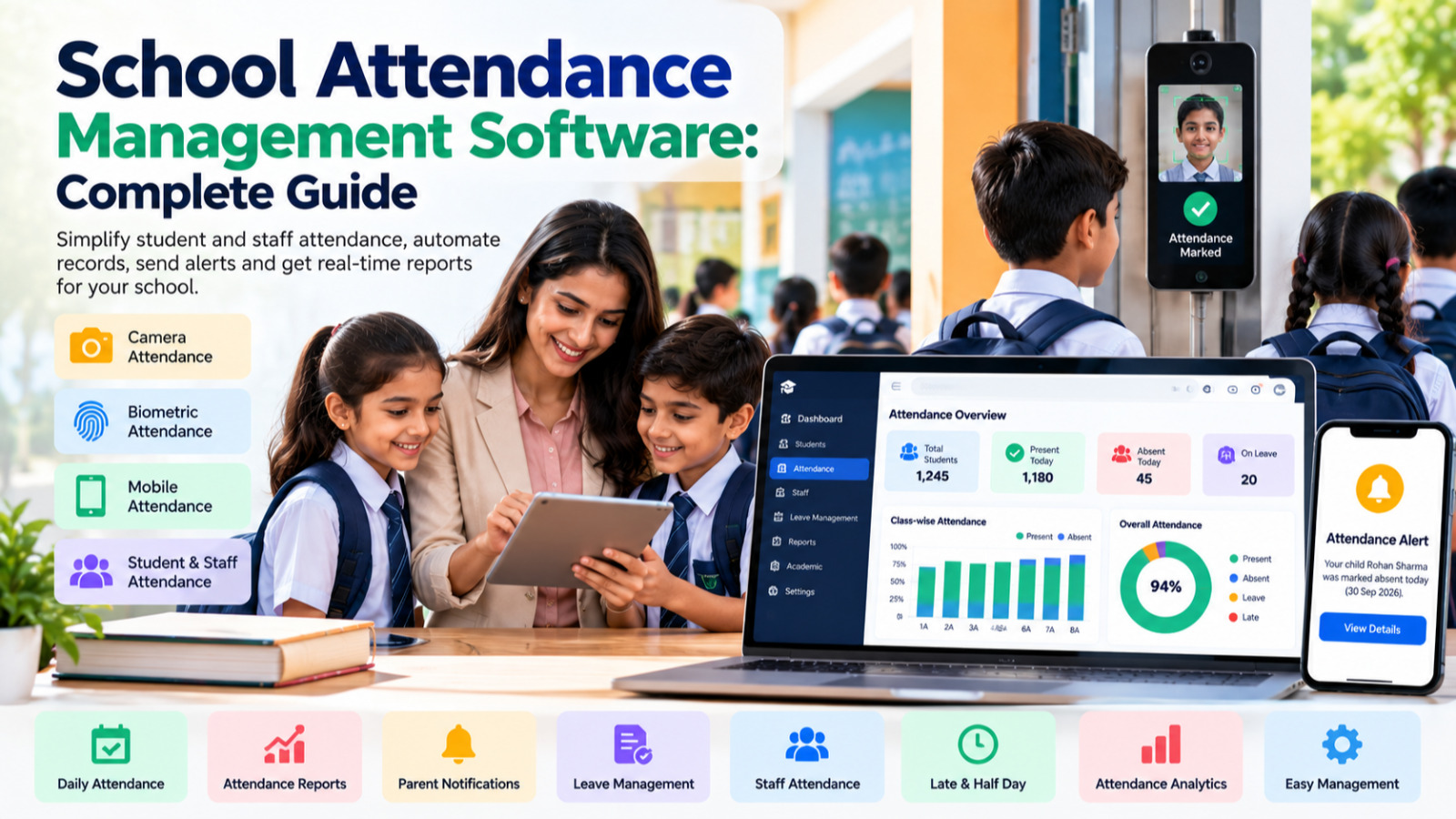

Attendance is one of the most important daily activities in every educational institution.
Schools need to record whether students are present, absent, on leave, or late. Teachers and administrators also need attendance records for monitoring, reporting, communication, and academic administration.
When attendance is maintained using paper registers or separate spreadsheets, the process can become time-consuming and difficult to monitor, especially as the number of students increases.
This is where School Attendance Management Software can help.
A modern attendance management system allows schools to record, manage, monitor, and report attendance through a centralized digital platform.
From daily classroom attendance to monthly reports, parent notifications, staff attendance, and management dashboards, an integrated attendance system can simplify one of the most repetitive activities in school administration.
What Is School Attendance Management Software?
School Attendance Management Software is a digital system designed to manage attendance records for students and, depending on the platform, teaching and non-teaching staff.
Instead of maintaining attendance in physical registers, teachers or authorized staff can record attendance digitally.
A School Attendance Management System may provide features such as:
-
Student attendance
-
Staff attendance
-
Class-wise attendance
-
Section-wise attendance
-
Daily attendance
-
Monthly attendance
-
Leave management
-
Late attendance
-
Attendance corrections
-
Attendance reports
-
Parent notifications
-
Attendance dashboards
-
Attendance analytics
-
Digital attendance records
-
Camera or biometric-based attendance, where supported
When attendance is integrated into a complete School ERP, attendance information can also connect with student profiles, parent communication, academics, examinations, and reporting.
Why Do Schools Need Attendance Management Software?
Traditional attendance management usually involves a teacher taking attendance in a physical register.
At the end of the day or month, administrative staff may need to collect information from different classes and prepare reports.
This can create several challenges:
-
Manual data entry
-
Paper-based records
-
Difficulty finding historical attendance
-
Time-consuming report preparation
-
Duplicate data entry
-
Attendance calculation errors
-
Delayed parent communication
-
Difficulty monitoring frequent absences
A digital attendance system can organize this information centrally.
Instead of maintaining separate registers for every class, the school can maintain attendance records within one system.
Traditional Attendance vs. Digital Attendance
A traditional attendance process may look like:
Teacher → Attendance Register → Office → Manual Data Entry → Report
A digital process can be:
Teacher → Digital Attendance → Centralized Database → Reports & Notifications
This difference becomes particularly important when a school has hundreds or thousands of students.
Key Features of School Attendance Management Software
1. Digital Student Attendance
Teachers can record student attendance directly through a computer, tablet, or mobile device, depending on the system.
Common attendance statuses may include:
-
Present
-
Absent
-
Late
-
Leave
-
Half Day
The attendance record can then be associated with the student's profile.
This eliminates the need to maintain separate paper registers.
2. Class-Wise Attendance
Teachers can view students according to their class and section.
For example:
Class 8-A
-
Total Students: 42
-
Present: 39
-
Absent: 2
-
Leave: 1
This makes daily attendance easier to record and review.
3. Section-Wise Attendance
Schools with multiple sections can manage attendance separately for each section.
For example:
-
Class 5-A
-
Class 5-B
-
Class 5-C
-
Class 5-D
Administrators can view attendance according to class and section without maintaining separate physical registers.
4. Subject-Wise or Period-Wise Attendance
Some institutions require attendance to be recorded for individual periods or subjects.
A suitable attendance system can support workflows such as:
Period 1 → Mathematics
Period 2 → English
Period 3 → Science
This can provide a more detailed attendance history where required.
The exact functionality depends on the school's attendance policy and ERP configuration.
5. Staff Attendance Management
Attendance management does not only apply to students.
Schools also need to manage attendance for:
-
Teachers
-
Administrative staff
-
Support staff
-
Drivers
-
Conductors
-
Other employees
A School ERP with staff attendance can provide a centralized view of employee attendance.
It may also connect with:
-
Leave management
-
Payroll
-
HR records
-
Monthly attendance reports
This creates a more connected HR workflow.
6. Leave Management
Students and staff may be absent because of approved leave.
An integrated system can maintain:
-
Leave applications
-
Leave dates
-
Leave type
-
Approval status
-
Attendance impact
-
Leave history
This helps distinguish approved leave from unexplained absence.
7. Attendance Percentage Calculation
Manually calculating attendance percentages can take time.
An attendance system can automatically calculate attendance based on recorded attendance data.
For example:
Attendance Percentage = Days Present ÷ Total Applicable Days × 100
The system can provide student-wise attendance percentages for selected periods.
This can be useful for:
-
Academic monitoring
-
Parent communication
-
Internal policies
-
Examination eligibility rules, where applicable
-
Administrative reports
Schools should configure attendance calculations according to their own academic and attendance policies.
8. Parent Attendance Notifications
One of the most useful features of digital attendance management is timely communication with parents.
Depending on the communication integrations available, schools can notify parents when:
-
A student is marked absent
-
A student arrives late
-
Attendance falls below a configured threshold
-
A leave request is approved
-
Other attendance-related events occur
This can help parents stay informed about their child's attendance.
9. Camera-Based Attendance
Modern technology can provide alternative ways to record attendance.
Some school systems support camera-based or facial-recognition attendance workflows, subject to the school's technology setup, applicable policies, and privacy requirements.
A camera-based system can potentially reduce manual attendance work by identifying students and recording attendance digitally.
However, schools should carefully consider:
-
Consent requirements
-
Data protection
-
Accuracy
-
Environmental conditions
-
Device availability
-
Security
-
Applicable laws and institutional policies
Technology should support the school's attendance process rather than introduce unnecessary complexity.
10. Biometric Attendance
Biometric devices can also be used for attendance.
Depending on the implementation, biometric attendance may use:
-
Fingerprint
-
Facial recognition
-
Other supported biometric technologies
Biometric attendance can be particularly relevant for staff attendance or controlled environments.
Schools should evaluate privacy, security, device reliability, and regulatory requirements before implementing biometric systems.
11. Mobile Attendance
Teachers are frequently moving between classrooms and activities.
A mobile-friendly attendance system allows authorized teachers to record attendance without being tied to a particular desktop computer.
A mobile interface can be useful for:
-
Classroom attendance
-
Activity attendance
-
Trips
-
Events
-
Special classes
-
Staff attendance
The exact functionality depends on the School ERP platform.
12. Attendance Dashboard
A centralized dashboard can provide school management with an overview of attendance.
Important indicators can include:
-
Total students
-
Present today
-
Absent today
-
Students on leave
-
Attendance percentage
-
Class-wise attendance
-
Students with frequent absences
-
Staff attendance
For school owners and principals, this provides a quick operational overview without requiring teachers to submit separate reports.
13. Attendance Reports
Reports are one of the most important parts of attendance management.
A School Attendance Management System can provide reports such as:
Daily Attendance Report
Shows attendance for a selected date.
Monthly Attendance Report
Provides attendance information for an entire month.
Student-Wise Attendance Report
Shows an individual student's attendance history.
Class-Wise Attendance Report
Shows attendance for a selected class.
Section-Wise Report
Provides attendance information for a specific section.
Staff Attendance Report
Shows employee attendance information.
Absentee Report
Identifies students who are absent on a selected day.
Attendance Percentage Report
Shows attendance percentages for selected students or classes.
These reports reduce the need for manual calculations.
14. Attendance History
A digital system can maintain historical attendance records.
Authorized users may be able to view attendance by:
-
Date
-
Academic year
-
Class
-
Section
-
Student
-
Subject
-
Teacher
This is much easier than searching through physical registers from previous months or academic years.
15. Attendance Correction and Approval
Sometimes attendance needs to be corrected.
For example, a student may have been marked absent accidentally even though they were present.
An attendance management system can provide controlled correction workflows.
Depending on the system, corrections may require:
-
Reason for correction
-
Updated attendance
-
Approval by authorized staff
-
Audit history
This helps maintain better control over attendance records.
16. Attendance Alerts
Schools may want to identify students whose attendance requires attention.
An ERP can provide alerts based on configured conditions.
For example:
-
Attendance below a specified percentage
-
Repeated absence
-
Consecutive absence
-
Frequent late arrival
These alerts can help administrators and teachers identify attendance patterns earlier.
17. Attendance and Academic Management
Attendance is closely connected with academic activities.
Students who frequently miss classes may miss:
-
Lessons
-
Assignments
-
Practical activities
-
Tests
-
Examinations
When attendance and academic information are available within the same ERP, teachers and administrators can view a more complete picture of a student's school activity.
However, attendance should be considered alongside other relevant academic and contextual information rather than being treated as the only measure of student engagement.
18. Attendance and Parent Communication
Parents often want timely information about their child's attendance.
Instead of waiting for a monthly report, schools can provide attendance information through a parent portal or mobile application.
Parents may be able to view:
-
Today's attendance
-
Monthly attendance
-
Attendance percentage
-
Leave records
-
Absence history
This improves transparency between schools and families.
19. Attendance and Payroll
For staff, attendance can be connected with HR and payroll workflows.
Depending on the ERP, attendance information may be used to support:
-
Monthly attendance calculation
-
Leave deductions
-
Payroll processing
-
Overtime
-
Late records
-
Staff attendance reports
This eliminates the need to repeatedly enter attendance information into separate HR or payroll systems.
20. Attendance Analytics
Raw attendance records become more useful when converted into meaningful reports and trends.
School management can analyze:
-
Average attendance
-
Class-wise attendance
-
Monthly trends
-
Frequent absences
-
Late arrivals
-
Staff attendance
-
Attendance changes over time
These insights can help administrators identify areas requiring attention.
Benefits of School Attendance Management Software
Benefits for School Owners
-
Centralized attendance visibility
-
Better operational monitoring
-
Automated reports
-
Reduced paperwork
-
Improved data accessibility
Benefits for Principals
-
School-wide attendance overview
-
Class and section monitoring
-
Absence tracking
-
Attendance alerts
-
Management reports
Benefits for Teachers
-
Faster attendance recording
-
Easy student list access
-
Reduced paperwork
-
Digital attendance history
-
Easier report generation
Benefits for Parents
-
Timely attendance information
-
Access to attendance history
-
Absence notifications
-
Better communication with school
Benefits for HR and Administration
-
Centralized staff attendance
-
Leave integration
-
Payroll support
-
Attendance reports
School Attendance Software vs. Manual Registers
| Manual Attendance | Attendance Management Software |
|---|---|
| Paper registers | Digital attendance |
| Manual calculations | Automatic calculations |
| Physical storage | Centralized records |
| Manual reports | Automated reports |
| Delayed parent communication | Automated notifications |
| Difficult historical searches | Easy attendance history |
| Separate staff records | Integrated staff attendance |
| Limited analytics | Attendance dashboards |
| Higher repetitive work | Automated workflows |
The goal of attendance software is not simply to eliminate paper.
It is to create a centralized attendance workflow that connects teachers, students, parents, administration, and management.
How School Attendance Software Integrates With School ERP
Attendance becomes even more useful when it is part of a complete School ERP.
A student's information can flow through:
Admission
↓
Student Profile
↓
Class & Section
↓
Attendance
↓
Academics
↓
Examinations
↓
Results
At the same time, attendance can connect with:
Parent Communication
Leave Management
Staff Management
Payroll
Reports & Analytics
This reduces duplicate data entry and keeps important information within one centralized system.
How S2DENTSHIVE Helps With Attendance Management
S2DENTSHIVE provides attendance management as part of an integrated School ERP environment.
Schools can use the platform to manage important areas such as:
-
Student attendance
-
Staff attendance
-
Class-wise attendance
-
Section-wise attendance
-
Attendance reports
-
Attendance history
-
Leave management
-
Attendance dashboards
-
Parent communication
-
Camera attendance
-
Academic information
-
Examination management
-
Fee management
-
Admissions
-
Timetable
-
Transport
-
Hostel
-
Library
-
Inventory
-
Staff management
The objective is to avoid managing attendance through one application while managing student, fee, academic, and administrative information somewhere else.
With an integrated system, attendance becomes part of the student's complete digital record.
How to Implement Attendance Software in a School
Successful implementation requires more than installing software.
Schools should plan the process carefully.
Step 1: Define Attendance Rules
Determine:
-
What counts as present?
-
How is late attendance handled?
-
How is leave recorded?
-
Are half-days supported?
-
Is attendance period-wise?
-
What reports are required?
Step 2: Configure Classes and Sections
Ensure the school's academic structure is correctly configured.
Step 3: Add Students and Staff
Attendance depends on accurate student and employee records.
Step 4: Assign Teachers
Make sure teachers have access to the classes or subjects for which they are responsible.
Step 5: Train Users
Teachers and administrators should understand how to mark, review, and correct attendance.
Step 6: Configure Notifications
If the school uses attendance alerts, configure the appropriate communication channels.
Step 7: Monitor Reports
Management should regularly review attendance trends and system usage.
What Should Schools Look for in Attendance Management Software?
Before selecting a School Attendance Management System, schools should evaluate:
Ease of Use
Teachers should be able to record attendance quickly.
Mobile Accessibility
Mobile access can be useful for teachers who move between classrooms.
Flexible Attendance Rules
The software should support the school's attendance policies.
Reporting
Check whether daily, monthly, student-wise, class-wise, and staff reports are available.
Notifications
Evaluate the available parent communication options.
Integration
Attendance should ideally connect with student management, leave, HR, payroll, academics, and other relevant modules.
Security
Student and staff attendance data should be protected through appropriate access controls and security practices.
Scalability
The system should support the institution as student and staff numbers grow.
Support
Training, implementation, and technical support should also be considered.
The Future of School Attendance Management
School attendance is moving beyond the traditional classroom register.
Digital systems can combine:
Attendance + Mobile Access + Notifications + Analytics + Student Records + Parent Communication
Technology such as camera-based attendance and other automated identification methods can further reduce manual work where appropriate.
However, technology should always be implemented with attention to accuracy, privacy, security, consent, and the school's specific requirements.
The goal should be simple:
Record attendance accurately, make information accessible, and reduce unnecessary administrative work.
Conclusion
Attendance is a daily responsibility, but managing attendance does not have to be a daily administrative burden.
Traditional registers and spreadsheets can work for basic requirements, but as schools grow, managing attendance manually can become increasingly time-consuming.
School Attendance Management Software provides a centralized and digital approach to student and staff attendance.
With features such as digital attendance, mobile access, attendance reports, automated calculations, leave management, parent notifications, dashboards, and attendance analytics, schools can make attendance management more organized.
When attendance is integrated with a complete School ERP, it can also connect with student profiles, academics, examinations, fees, staff management, payroll, communication, transport, hostel, and other school operations.
For school owners and principals looking to reduce paperwork and bring their school operations into one centralized platform, an integrated solution such as S2DENTSHIVE can help simplify attendance and overall school management.
Record attendance smarter. Communicate faster. Manage your school from one centralized system.
Comments (0)
Share your thoughts or ask a question about this article.
Leave a Comment